swayfx-enhanced

Sway is an incredible window manager, and certainly one of the most well established Wayland window managers. However, it is restricted to only include the functionality that existed in i3. This fork ditches the simple wlr_renderer, and replaces it with our fx_renderer (via scenefx), capable of rendering with fancy GLES2 effects.
Note: this is a fork of the original swayfx repository.
SwayFX expands Sway’s feature set to include eye-candy that many users have been asking for:
- Blur: Sophisticated background blur for windows and layers.
- Shadows: Real-time window drop shadows.
- Rounded Corners: Anti-aliased rounded corners for windows, borders, and titlebars.
- Animations: Smooth window movement and resizing animations, plus fast default pop/expand animations when windows open and close.
- Scrollable Tiling: Fixed-width horizontal columns with animated workspace panning, wrap-around navigation, and direct column resizing.
- New: Liquid Glass (Experimental): A unique refractive glass effect.
- Dimming: Dim unfocused windows to help you focus.
- Layer Shell Effects: Apply blur, shadows, and rounded corners to panels and notifications.
- Scratchpad treated as minimize: Allows docks and taskbars to correctly interpret minimize/unminimize requests.
- Nixified: First-class support for Nix and NixOS.
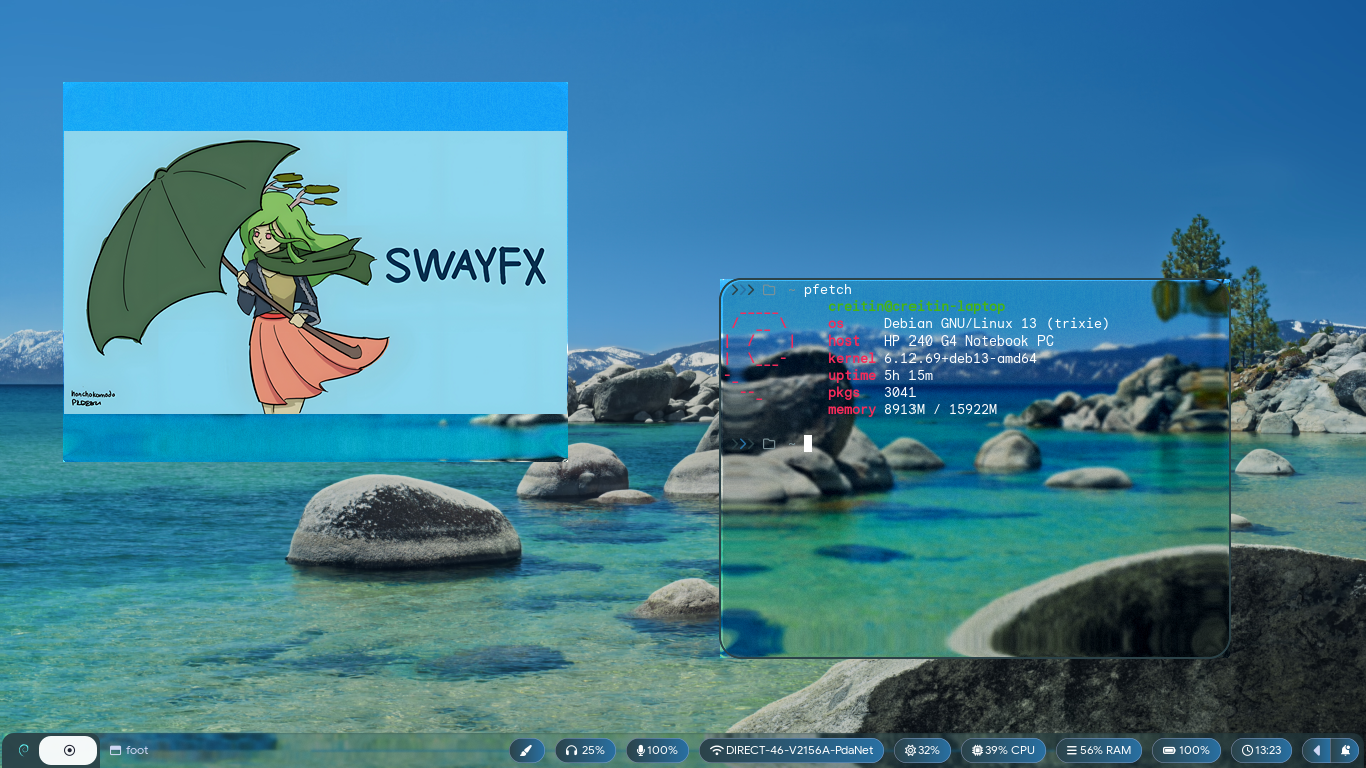 </img>
ignore the insane RAM usage in this pic
</img>
ignore the insane RAM usage in this pic
Animations
Control the duration of window movement and resizing animations.
animation_duration_ms <value>: Duration in milliseconds (0-5000, default: 90).
New windows use pop/expand animations by default when opening and closing, using the same animation timing.
Default config convenience:
Mod+m maximize: Maximize the focused window to the current workspace without entering fullscreen.
Scrollable Tiling
Enable a niri-style horizontal strip layout for top-level tiled windows.
workspace_layout scrollable: Make new workspaces default to the scrollable layout.layout scrollable: Switch the current workspace to the scrollable layout. In config, this also acts as a default-layout alias.layout splith|splitv|stacking|tabbed|default: Switch back out of scrollable mode.scroll left|right [<px> px]: Pan the scrollable workspace camera. Defaults to100pxwhen no amount is given.scroll center: Center the focused column in the visible area.scroll home|end: Jump the camera to the beginning or end of the workspace strip.scroll follow: Return to focus-following camera behavior.scrollable_tiling_touchpad_scroll enable|disable: Enable direct two-finger horizontal touchpad panning for scrollable workspaces. Disabled by default.scrollable_tiling_touchpad_scroll_factor <float>: Scale touchpad pan distance. Defaults to1.0.scrollable_tiling_touchpad_pinch_resize enable|disable: Enable touchpad pinch resizing for the focused scrollable column. Disabled by default.scrollable_tiling_touchpad_pinch_resize_factor <float>: Scale pinch resize sensitivity. Defaults to1.0.
Current interaction behavior:
- New tiled windows open as new top-level columns.
- Two-finger horizontal touchpad gestures pan the workspace camera when
scrollable_tiling_touchpad_scrollis enabled. - Pinch outward grows the focused scrollable column and pinch inward shrinks it when
scrollable_tiling_touchpad_pinch_resizeis enabled. Maximized columns pass pinch gestures through to apps for page zoom. Shift+ mouse wheel moves focus left or right across columns using the focused window, not the pointer location.$mod+Shift+Left/Rightmoves the focused column left or right in the scrollable strip.- Focus navigation wraps around at the ends of the strip.
Mod+ right click resizes scrollable columns directly.- Tiling drag gestures reorder top-level columns instead of splitting them.
- Dragging a column near the left or right edge auto-scrolls the workspace strip.
- The workspace camera animates smoothly and uses edge handoff instead of hard centering on every focus change.
Blur
Global blur settings and per-window toggles.
blur <enable|disable>: Global toggle.blur_xray <enable|disable>: Blur floating windows based on the desktop background instead of windows below.blur_passes <integer>: Number of blur passes (0-10).blur_radius <integer>: Blur radius (0-10).blur_noise <float>: Amount of noise to add to the blur (0-1).blur_brightness <float>: Adjust blur brightness (0-2).blur_contrast <float>: Adjust blur contrast (0-2).blur_saturation <float>: Adjust blur saturation (0-2).for_window [CRITERIA] blur <enable|disable>: Per-window toggle.
Corner Radius
corner_radius <pixels>: Set the radius for rounded corners.smart_corner_radius <enable|disable>: Automatically disable rounded corners when a window is fullscreen or the only one on a workspace (if gaps are 0).
Shadows
shadows <enable|disable>: Global toggle.shadows_on_csd <enable|disable>: Enable shadows on windows with Client-Side Decorations.shadow_blur_radius <pixels>: Blur radius for shadows (0-99).shadow_color <hex>: Shadow color (e.g.,#0000007F).shadow_inactive_color <hex>: Shadow color for unfocused windows.shadow_offset <x> <y>: Offset for the shadow.
Dimming
default_dim_inactive <0.0 - 1.0>: Set the default dimming for inactive windows.for_window [CRITERIA] dim_inactive <0.0 - 1.0>: Per-window dimming.dim_inactive_colors.unfocused <hex>: Color used for dimming unfocused windows.dim_inactive_colors.urgent <hex>: Color used for dimming urgent windows.
Layer Shell Effects
Apply effects to specific layer shell namespaces (e.g., “waybar”, “notifications”).
layer_effects <namespace> <effects>- Available Effects:
blur <enable|disable>blur_xray <enable|disable>blur_ignore_transparent <enable|disable>shadows <enable|disable>corner_radius <pixels>
- Example:
  layer_effects "waybar" {
      blur enable
      blur_ignore_transparent enable
      shadows enable
      corner_radius 10
  }
Liquid Glass (Experimental)
A refractive glass effect that distorts the background.
liquid_glass <enable|disable>liquid_glass_bezel_width <float>liquid_glass_brightness_boost <float>liquid_glass_chromatic_aberration <float>liquid_glass_noise_intensity <float>liquid_glass_refraction_index <float>liquid_glass_saturation_boost <float>liquid_glass_specular <on/off>liquid_glass_specular_opacity <float>liquid_glass_specular_angle <float>liquid_glass_surface <convex_circle|convex_squircle|concave|lip>liquid_glass_thickness <float>
Miscellaneous
titlebar_separator <enable|disable>: Show or hide the separator between the titlebar and window content.scratchpad_minimize <enable|disable>: Treat hiding a window to the scratchpad as minimizing it.
Xwayland Compatibility
This fork requires wlroots Xwayland support at build time, starts Xwayland immediately by default, and installs the default config with:
xwayland force
Display managers launch the session through sway-xwayland-session, which keeps common GUI toolkits on native Wayland by default while leaving Xwayland available for X11-only apps:
XDG_SESSION_TYPE=wayland
GDK_BACKEND=wayland,x11
QT_QPA_PLATFORM='wayland;xcb'
SDL_VIDEODRIVER=wayland,x11
CLUTTER_BACKEND=wayland
MOZ_ENABLE_WAYLAND=1
ELECTRON_OZONE_PLATFORM_HINT=wayland
Ways to check a running system:
swayfx-check-xwayland
echo "$DISPLAY"
pgrep -a Xwayland
swaymsg -t get_tree | grep '"shell": "xwayland"'
If the final command has no output, launch an X11 test client first, such as env GDK_BACKEND=x11 xeyes, then run it again.
Roadmap
- Improve Liquid Glass stability and performance.
Compiling From Source
Nix
If you have Nix installed, you can build and run SwayFX easily:
nix build
./result/bin/sway
For development:
nix develop
Debian
Check INSTALL-deb.md
Container (Docker)
docker compose up --build
Manual Steps
Install dependencies:
meson, wlroots, wayland, wayland-protocols, pcre2, json-c, pango, cairo, scenefx, gdk-pixbuf2 (optional), swaybg (optional), scdoc (optional).
meson build/
ninja -C build/
sudo ninja -C build/ install
ASan Debugging
When chasing compositor crashes or memory corruption, build a separate AddressSanitizer binary so the normal build/ tree stays untouched:
meson setup build-asan -Db_sanitize=address -Dbuildtype=debug -Doptimization=0
ninja -C build-asan sway/sway
Run the instrumented compositor and save its debug output:
ASAN_OPTIONS=halt_on_error=1:abort_on_error=1:detect_leaks=0 \
./build-asan/sway/sway -d 2> /tmp/swayfx-asan.log
After reproducing the crash, inspect the log for the allocator report and stack trace:
rg -n "AddressSanitizer|ERROR:|SUMMARY:" /tmp/swayfx-asan.log
tail -n 200 /tmp/swayfx-asan.log
Acknowledgements
SwayFX is a community project built on the shoulders of giants. We thank:
- The Sway maintainers and contributors for the solid foundation.
- pkdesuwu and honchokomodo for the SwayFX mascot.
- spooky_skeleton for the SwayFX logo, and Basil for refinements.
- Our amazing community for testing and supporting the project.
todo
- steal Niriwm features